Struggling with file size too large or invalid dimensions errors while filling out Indian Government job applications? You are not alone. Every recruitment board whether it is SSC, UPSC, IBPS, NTA, Railway (RRB), or State Police has strict guidelines for scanned signatures, usually requiring exact dimensions like 140×60 pixels and tight file size limits 10KB–20KB.
Welcome to the ultimate Signature Resizer & Editor Tool specifically built for students, CSC VLE operators, and cyber cafe owners. Use this free signature editor to crop, clean, enhance, and compress your signature photo to the exact KB and pixel requirements. Whether you need a quick sign resize or a full signature resize with background cleaning do it all in just one click without losing clarity!
Official Signature Specifications for Major Exams
| Exam Board / Form | Format | File Size (KB) | Dimensions (Width x Height) |
|---|---|---|---|
| SSC (CGL, CHSL, MTS) | JPG / JPEG | 10 KB – 20 KB | 140 x 60 Pixels |
| UPSC Civil Services | JPG / JPEG | 20 KB – 300 KB | 350 x 350 Pixels (Min) |
| IBPS (PO, Clerk, SO) | JPG / JPEG | 10 KB – 20 KB | 140 x 60 Pixels |
| UP Police (UPPRPB) | JPG / JPEG | 5 KB – 20 KB | 3.5 cm x 1.5 cm |
| Railway (RRB) | JPG / JPEG | 10 KB – 20 KB | 50mm x 20mm (140x60 px) |
| NTA (NEET, JEE) | JPG / JPEG | 4 KB – 30 KB | 100 x 40 Pixels |
| GATE Exam | JPG / JPEG | 3 KB – 300 KB | 580 x 180 Pixels |
How to Use the Signature Resizer Tool (Step-by-Step)
Follow these simple steps to resize and edit your signature online perfectly for any government exam form.
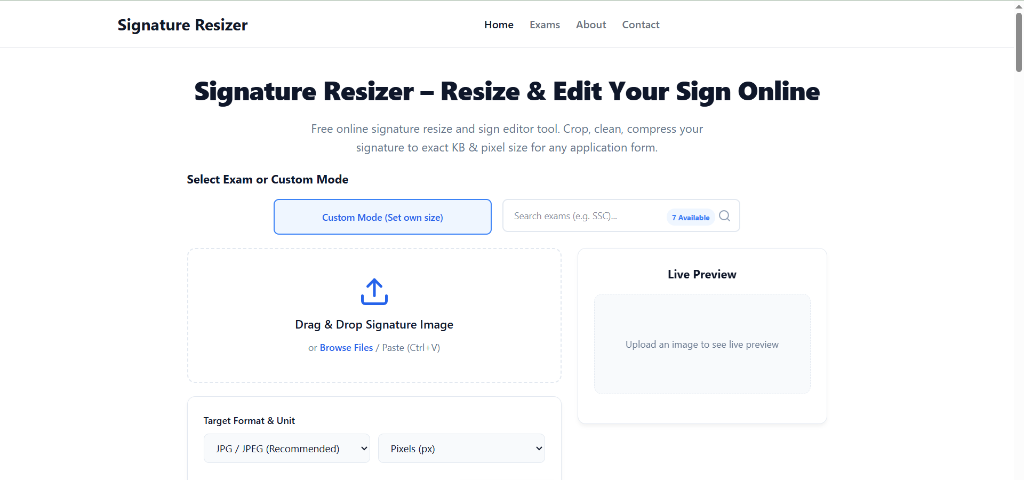
Step 1: Upload Image & Select Exam
Click on the upload box or drag your signature photo. Then select your specific exam from the dropdown to automatically apply the required width, height, and KB limit.
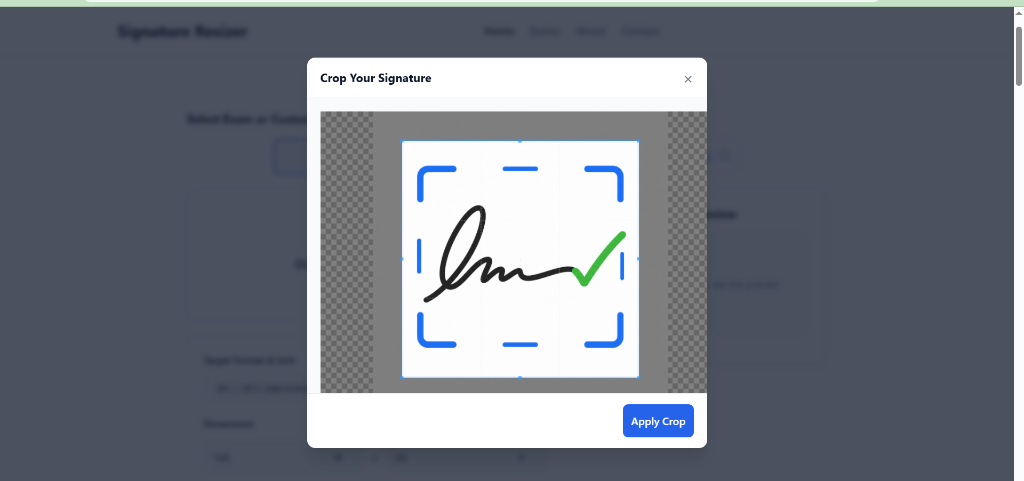
Step 2: Crop Your Signature
Use the cropping tool to select just your signature, removing unnecessary background. Click 'Apply Crop' to continue.
Step 3: Check Validation Receipt & Download
Review the final dimensions, file size, and DPI in the Live Preview box. New Feature: Our system now generates a Final Validation Receipt confirming that your Width, Height, Format, and File Size match the exact official requirements (showing a green '✅ Requirements Matched' badge). Once verified, click the 'Download Resized Signature' button.
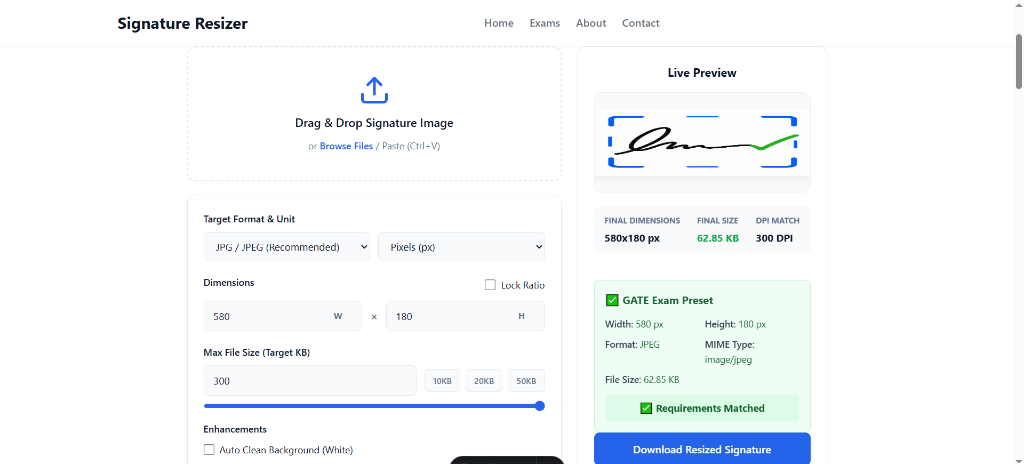
New Feature: Final Validation Receipt
Simply compressing an image to under 20KB is not always enough for modern exam portals. They actively scan for correct Width, Height, Image Format (like JPEG), MIME Type, and exact File Size limits.
To give you 100% confidence, we have introduced the Final Validation Receipt. After resizing, the tool now generates an instant receipt showing:
- Exact output dimensions (Width & Height in px)
- Image Format and MIME Type (e.g., image/jpeg)
- Final File Size in KB
- A green "✅ Requirements Matched" status confirming that the image is successfully prepared according to the exam portal rules.
This ensures you never face a "Format not supported" or "Invalid Dimensions" error during your application form filling.
Pro Tips for a Perfect Signature Upload
Ensure your signature gets accepted on the first try by following these quick tips:
- Use plain white paper: Always sign on unruled paper without any lines using a thick black or dark blue pen.
- Ensure good lighting: Take the photo in natural light to avoid dark shadows on the paper.
- Hold the camera steady: Click the picture from directly above the signature to prevent distortion or blurriness.
- Crop tightly: Leave only a small margin of white space around your signature ink before resizing it.
- Enable Auto Clean: Use our built-in auto clean feature to instantly remove any greyish background and make the ink pop.
Top Reasons for Signature Rejection And How We Fix It
Thousands of government job applications are rejected every year due to invalid signature uploads. Avoid these common mistakes:
- Dark or Shadowy Backgrounds: Taking photos in a dark room makes the background look grey, which is strictly not allowed. Solution: Our Auto-Clean feature fixes this instantly.
- Block Capital Letters: Signatures done entirely in block capital letters are instantly rejected by boards like SSC and IBPS. Always use your normal running handwriting.
- Wrong Aspect Ratio (Squashed Image): Forcing a square photo into a rectangular 140x60px box will stretch and squash your signature. Solution: Crop your signature closely around the ink before applying our resizer.
- Blurry or Pixelated Images: Aggressively compressing an image to force it under 10KB often ruins the quality. Solution: Our advanced compression algorithm retains HD clarity even at low file sizes.
Why Use Our Online Signature Editor & Sign Resize Tool?
Unlike generic image editors, our dedicated signature editor is purpose-built for government application forms. Here is what makes this sign resize tool the top choice for lakhs of students:
- One-Click Signature Resize: Select your exam preset and the tool automatically locks width, height, and max KB. No manual guesswork needed.
- Smart Signature Editor Features: Auto-clean background to pure white, increase ink contrast, and remove shadows using our in-browser processing.
- Instant Sign Resize for Any Form: Works for SSC, UPSC, IBPS, NTA, Railway, UP Police, and 50+ other exam formats. Just search your exam and click.
- 100% Free and Private: No signup, no watermarks, no server upload. Your signature never leaves your device.
- Mobile-Friendly Signature Resizer: Works perfectly on phones and tablets. Take a photo, resize, and upload right from your mobile browser.
Frequently Asked Questions
How to resize a signature for the SSC Form?
Just select the SSC preset from the dropdown above. It automatically sets the required dimensions 140x60 pixels and restricts the output size to between 10KB and 20KB as per the official SSC guidelines.
How can I reduce my signature file size below 20KB without losing clarity?
Our tool uses an advanced compression algorithm specifically designed for document images. By keeping the target format as JPEG and checking the Auto Clean Background option your signature stays sharp while dropping well below 20KB.
What is the signature requirement for UPSC Forms?
UPSC requires your signature to be at least 350x350 pixels or a proportionate rectangle with a file size ranging from 20KB to 300KB. You can use our UPSC preset to meet these guidelines easily.
Can I resize my signature in Centimeters (CM) instead of Pixels?
Yes! In the Custom Mode settings, simply change the Target Format & Unit dropdown from Pixels to Centimeters. For example UP Police requires 3.5cm x 1.5cm.
Is it safe to upload my signature here?
Absolutely. Signature Resizer processes all images locally inside your browser. We never upload, store, or see your signatures or personal data.
What is an online signature editor?
An online signature editor is a browser-based tool that lets you crop, resize, clean the background, and adjust the contrast of your scanned signature image. Our signature editor is specifically designed for Indian government exam forms, so it comes with built-in presets for SSC, UPSC, IBPS, and more.
How to sign resize for government forms?
To sign resize for any government form: upload your signature image, select the exam preset (e.g., SSC, UPSC), and click download. The tool automatically adjusts the width, height, and file size to match the official requirements. You can also use Custom Mode for manual sign resize with your own dimensions.
What is the difference between signature resize and signature compress?
Signature resize changes the pixel dimensions width and height of your signature image, while signature compress reduces the file size in KB without changing dimensions. Our tool does both simultaneously — it performs a signature resize to the exact pixel requirements and compresses the file to stay within the KB limit set by your exam board.